
The morning a small shop’s website simply stopped answering
It was supposed to be a small online shop’s best day. A promotion had just gone live, but pages loaded slower and slower, then stopped loading at all. Customers messaged to say the checkout would not open. Nothing had been changed overnight, and the shop’s own internet connection was fine. The site was not broken. It was buried.
That is, in plain terms, what a DDoS attack does. Short for distributed denial of service, it floods a website, app, or service with so much junk traffic that real users cannot get through. The service is still there, but too busy answering fake requests to serve real people.
Table of Contents
The direct answer, without the jargon
Think of a shop with one door and one server. On a normal day, people walk in, buy something, and leave. Now imagine thousands arriving at once, blocking the door and refusing to move. Genuine customers cannot get in. A DDoS attack works the same way, except the crowd is computers and other internet-connected devices sending requests.
The word “distributed” matters. In an older denial-of-service attack, the flood came from one source. In a distributed attack, it comes from many sources at once, often across different countries, so there is no single address to block. This is the core difference in a DDoS vs DOS attack: one source versus many.
How a DDoS attack unfolds, step by step
Most large attacks start quietly, well before the target notices anything wrong.
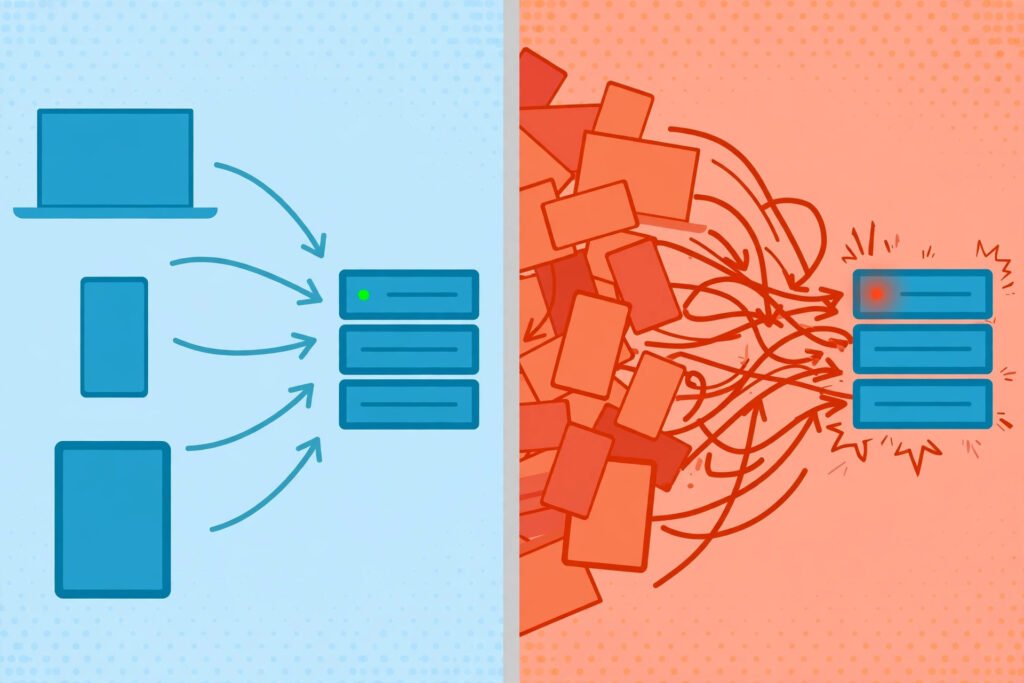
Step 1: Build a botnet. An attacker builds or rents a botnet attack force: devices infected with malware and controlled remotely, usually without their owners knowing. They can be home computers, phones, cameras, and routers left with weak passwords or unpatched software.

Step 2: Pick a weak point. The target might be the website, its server, its network connection, or a supporting service such as a DNS server, which translates domain names into addresses computers can use. Attackers look for whatever runs out of capacity first.
Step 3: Send the flood. At a chosen moment, the infected devices all send traffic toward the target at once. Individually, each request may look ordinary. Together, they cause server overload by overwhelming bandwidth or server capacity.
Step 4: Real users feel it. Pages time out, logins fail, or a game server drops players. From the outside, this website downtime can look exactly like a server crash, which is why the warning signs below matter.
Step 5: The attack stops, shifts, or gets filtered. Some attacks are short bursts. Others last longer and change tactics when one kind of flood gets blocked, which is why DDoS protection is rarely a single switch you flip once.
A worked example: the promotion that never got a chance
Picture a small shop whose website normally handles visitors without trouble. On promotion day, the owner expects slower pages. What they do not expect is that most of the new “visitors” are not shoppers at all.
In this illustrative ddos attack example, infected devices request the same product page again and again. Some open a connection and leave it hanging, tying up the server’s attention. Others ask for a heavy search page that forces extra work for every request. The connection fills up, the server runs out of room for new connections, and real shoppers time out before checkout.
Notice what did not happen. Nobody stole customer data or changed a price. A DDoS attack is primarily an availability attack: its goal is online service disruption, not theft. If customer data may also be at risk, that is a separate incident needing separate attention.
The main DDoS attack types
Not every flood works the same way. These are the main ddos attack types.
| Attack type | What it targets | What it looks like |
|---|---|---|
| Volumetric attack | Bandwidth | A huge network traffic flood, often using UDP or ICMP packets, saturates the connection so legitimate traffic cannot get through |
| Protocol attack | Server resources | Crafted requests, such as a SYN flood over TCP, exhaust connection tables so new connections cannot be established |
| Application layer attack | The website or app | Requests that look like normal HTTP traffic, but in huge numbers, exhaust the application or login system |
A volumetric attack is the bluntest kind: sheer size. A protocol attack abuses how computers agree to talk before exchanging data. An application layer attack is hardest to spot, because each request may look like a genuine visitor. Real attacks often mix these types.
Why do attackers do this? Some attacks are about extortion: pay up, or the site stays down. Some are competitive or political, aimed at disrupting a rival. Some are vandalism, and some are a distraction while another intrusion is attempted elsewhere, which is why a flood should never be treated as proof that nothing else is happening. Botnets make this cheap and scalable: the Mirai malware became widely known by infecting devices with weak default credentials and turning them into a botnet.
Signs of a DDoS attack, and how it differs from a genuine spike
A product launch and an attack can both make a site slow. Signs of a DDoS attack include:
- Traffic rises sharply with no promotion or news event you can identify.
- Many requests come from unusual locations, or repeat the same page without behaving like a normal visitor.
- The server saturates even though orders or logins do not rise with the traffic.
- Simple pages time out across the board, while internal systems appear healthy.
- Requests cluster on one expensive endpoint, such as search or login, rather than spreading naturally.
A genuine spike tracks a cause you can name and brings more purchases. When in doubt, your hosting provider can tell the difference from traffic patterns.
Common mistakes people make during a DDoS attack
The worst mistakes are usually made in the first panicked hour.
First, assuming the site is simply broken and restarting everything repeatedly. Rebooting a flooded server rarely helps, and it can wipe useful logs.
Second, blocking traffic too broadly. Blocking whole countries may stop some junk, but it can lock out genuine customers, and attackers can shift addresses quickly.
Third, treating a VPN as a shield for a website. A VPN protects a person’s own connection and can hide their IP address, which is why people ask: can a vpn prevent a ddos attack aimed at them personally? Our guide to what a VPN is explains how it works. But a VPN does not protect a public website from being flooded; that needs server-side protection. Similarly, knowing what your IP address is helps you understand how devices are identified online, but it is not a defence by itself.
Fourth, ignoring the attack once it stops. An attack that ends on its own may return, and its logs are the best evidence for better filtering before the second.
Fifth, forgetting the rest of security. Watch login attempts and admin accounts while the flood runs. A device infected with malware can be recruited into a botnet without its owner noticing, which is why patching and strong passwords matter even for a home router or camera.
What actually helps: DDoS mitigation and DDoS protection
DDoS mitigation means reducing the impact of an attack while it is happening. DDoS protection means the systems put in place beforehand so an attack does less damage. Neither is magic, and no single tool makes a site unattackable. So how to stop a DDoS attack in practice? Through layers:

- Absorb and spread the load. A content delivery network (CDN) with large network capacity can absorb traffic across many locations instead of letting it all hit one server. Services such as Cloudflare, Akamai, AWS Shield, and Google Cloud Armor operate at this scale, and many hosting plans include basic protection.
- Filter the junk. Traffic filtering separates malicious traffic from legitimate traffic before it reaches the application, by blocking bad patterns and challenging suspicious requests.
- Limit the rate. Rate limiting caps how many requests one source can make in a short period. It will not stop a huge flood alone, but it reduces load from aggressive sources.
- Scale and separate. Keeping the website, database, and supporting services separate means one flooded part does not necessarily take everything down.
- Get upstream help. Your hosting provider and internet service provider (ISP) can filter or reroute traffic before it reaches you. For a serious attack, contacting them early is often more useful than any setting you can change alone.
For a home user, the picture is simpler. You cannot filter an attack aimed at a game server you use. Keep your devices patched so they are not recruited into a botnet, and wait for the service itself to mitigate the flood. Paying for more bandwidth at home does not protect a remote service.
Practical checklist: what to do next
Before an attack: confirm what DDoS protection your hosting plan or CDN includes; keep software and devices patched and replace default passwords; keep backups separate from the live site.
During an attack: do not panic-restart everything; capture logs and screenshots first; contact your hosting provider with the start time; turn on any mitigation mode; tell users briefly what is happening.
After an attack: review logs to identify the attack type; tighten filtering based on what you actually saw; write down what worked. That cycle is real ddos attack prevention.
Related Reading
Frequently asked questions
What causes a DDoS attack?
A DDoS attack is caused deliberately by someone directing compromised devices to flood a target. It is not caused by ordinary popularity, although a viral moment can look similar.
How long does a DDoS attack last?
It varies widely. Some attacks are brief bursts lasting minutes. Others continue for hours or return in waves over days, depending on the attacker’s persistence and whether mitigation is working.
Is a DDoS attack illegal?
In most jurisdictions, deliberately flooding a service to knock it offline is illegal, even if no data is stolen. Laws vary by country, and proving who was behind it can be difficult. Keep logs and consider reporting a serious attack.
How can I tell a DDoS attack apart from my site just being popular?
Look for a cause and for real actions. A genuine spike usually follows a promotion and brings more orders or sign-ups. An attack often shows a sharp rise with no clear cause, repeated requests for the same resource, and high traffic alongside falling completions.
Can a VPN prevent a DDoS attack?
A VPN can hide an individual user’s IP address and protect that user’s own connection, which can help if someone is targeting that person directly. It does not protect a public website from being flooded, because attackers target the service’s own address. Website protection needs server-side mitigation.
The bottom line
A DDoS attack is not a sign that a website was badly built. It is a capacity problem created on purpose: too much junk traffic, arriving too fast for real users to get through. Capacity, filtering, rate limiting, and a provider who can help upstream will handle most attacks far better than any single trick. Prepare while things are calm, and respond with logs rather than guesswork.